
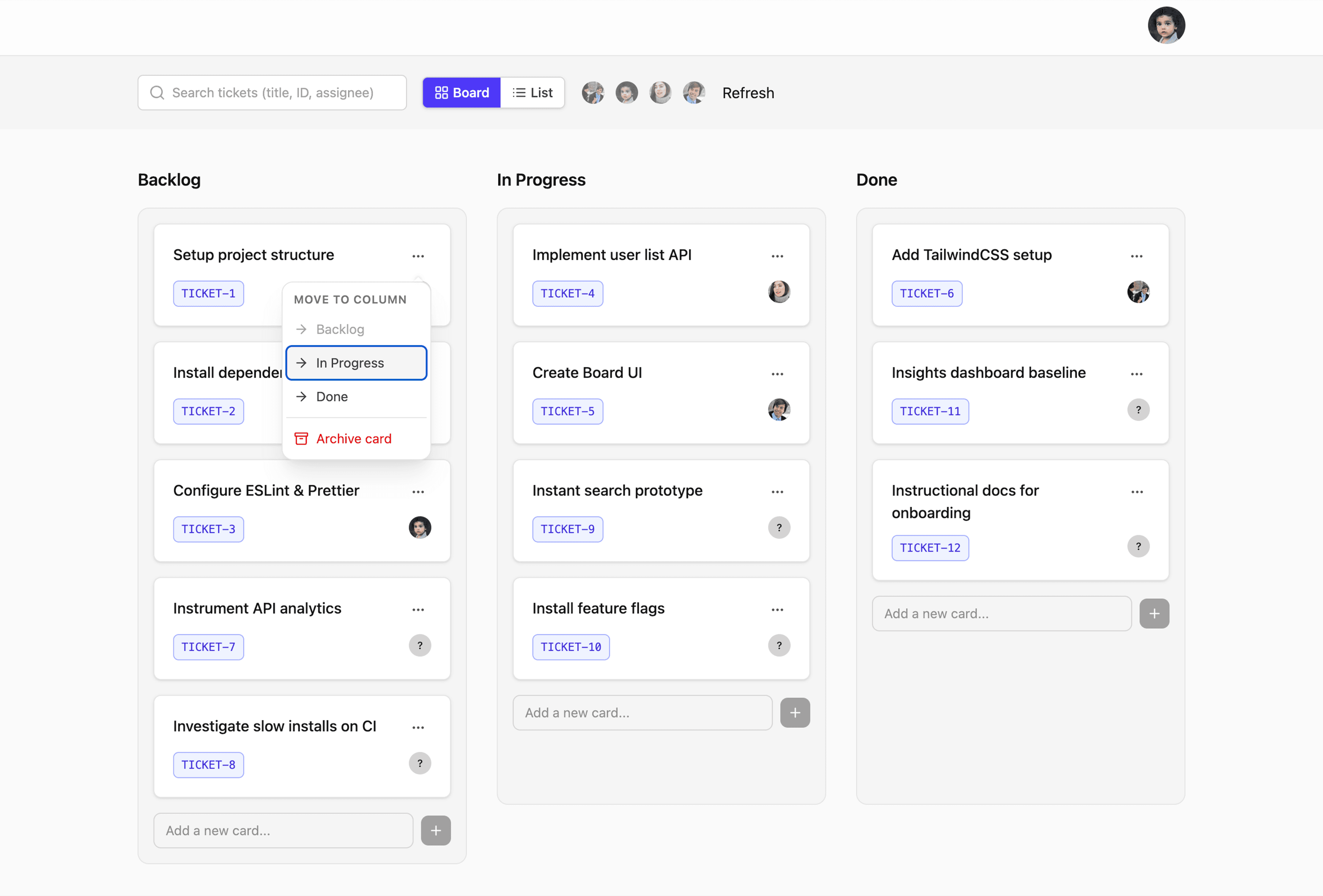
This is the course I wish existed when I first became the person everyone asked to “just make the frontend scale”.
Most engineers are trained to build features in isolation. But in a real app, features don’t ship alone — they sit inside a system: data models, fetching and mutation patterns, rendering strategies, and all the cross‑functional reality (performance, reliability, accessibility, security).
This course connects those dots so you can design scalable, maintainable frontend systems instead of patching features together until the codebase fights back.
The capstone: a board application (the running thread)
You’ll build a board-style application that evolves as you learn each concept — from normalization to pagination, caching, realtime updates, optimistic UI, and performance work.
If you like the board application case study style on this site, the course is the same vibe: concrete UI, then deep dive into the system around it.
The curriculum
One thread from first slice to full system
Below is the path the course takes — written as a single story so you can feel how each part hands off to the next, ending with a board you can reason about as a whole.
Module 1
Starting your learning journey
We open with the map: what “frontend system design” means here, how the board capstone threads through every topic, and how to move through the material without drowning in theory. You’ll wire up the starter repo, render a first slice of real UI from a small API, and see where the sharp edges usually appear when teams try to scale a frontend without a system.
Along the way I call out the pitfalls I see most often — over‑coupling UI to one data shape, hiding complexity in components instead of boundaries, and mistaking busywork for design. By the end of this stretch you should know how the rest of the journey fits together and what “good enough to ship and defend” looks like for you.
Module 2
Modeling and managing application data
Once the shell is moving, we slow down and ask how data should live in the client. A menu item that carries half the database in one object is a familiar pain — we walk a case study into something flatter, easier to reason about, and safer to change when product adds another dimension.
Normalization isn’t a buzzword here; it’s the moment the board stops lying to you. We refactor in steps, break things on purpose, and patch the defects that fall out — because that’s how you learn what the model actually guarantees. Store shape and selector strategy sit next to each other: you pick trade‑offs knowing what they cost at render time and when the server disagrees.
Module 3
Fetching data efficiently
With a clearer model, fetching stops being “call the API when the component mounts.” We look at how fast user input and navigation create overlapping requests — cancellation, debouncing, throttling — and when each is the honest answer. Pagination shows up in more than one shape: offset, cursor, infinite scroll — and you’ll land one of those paths in the board so the column stays fast when the list grows.
Caching is the quiet layer that either saves you or surprises you at 3am. We connect strategy to what users actually do on the page, then tighten the story so the next module — when data changes under you — doesn’t feel like a reset.
Module 4
Mutating and synchronizing data
Reads are only half the board. Deletes, assignments, and moves need a story too: what the UI assumes, what it shows while the network is in flight, and what happens when the answer is slower or different than you hoped. We implement flows that feel decisive without pretending the server is always instant.
Then the world gets wider: other people’s changes, or the server’s, need to show up without a full reload. We compare polling, SSE, and WebSockets in plain terms — where each shines and where each becomes noise. Optimistic updates get the same treatment: the joy when they work, the discipline when they don’t, and rollback that doesn’t strand the user.
Module 5
Optimizing performance
Performance is partly mechanics and partly perception. We choose rendering strategies with intent — what belongs in the client, what can stream, and what shouldn’t re‑render because a parent sneezed. You’ll see SSR in a concrete slice, then shift to what users feel: skeletons in the board, prefetch when intent is obvious, and lazy loading when the cost of loading everything up front is simply too high.
The thread closes with measurement that matches reality — not vanity metrics — so you can say what improved and why, before we widen the lens to everything that isn’t pure runtime speed.
Module 6
Preparing for production
Shipping means HTTP caches, tests, and security showing up in the same conversation as features. We touch caching headers and invalidation just deeply enough to reason with backends. Testing splits into fast feedback near logic and heavier paths that protect the flows users rely on — including the board paths you’ve already built.
Security and accessibility sit here as engineering choices: XSS, CSP, sanitization, inclusive patterns, and error boundaries that fail without humiliating the user. It’s the bridge between “works on my machine” and “works when things go wrong in production.”
Module 7
Building the capstone project
The board comes back as a whole system. Structure stays maintainable when folders match boundaries, not vibes. We refactor with the next feature in mind — editing flows, lazy boundaries for heavier pieces, and drag‑and‑drop that doesn’t lock out keyboard users.
This is where the earlier modules stop feeling like separate chapters and start reading as one product you could walk someone through in a review or interview — trade‑offs named, scars visible, room left for the next increment.
Module 8
Continuing your growth
We pull the narrative tight: the pillars you’ve been using all along, named in one place so you can reuse the frame on the next problem. The tooling landscape keeps shifting — including how AI fits into design and implementation — so we talk about what stays constant (clarity, contracts, empathy for the user and the next maintainer) even when the stack churns.
If you want to go deeper afterward, the thread continues in longer-form material and the community around it — but the arc here is complete: from first API slice to a capstone you can explain end to end.
FAQ
Frequently asked questions
Short answers to the questions people ask before enrolling — click a row to read more.